Introduction to Slicer
SlicerVM gives you real Linux, in milliseconds.
Full VMs with systemd and a real kernel, on your Mac, your servers, or your cloud. Slicer is built for teams that need isolation and control without moving code and data to third-party infrastructure.
By installing and starting Slicer, you agree to the End User License Agreement (EULA).
Where Slicer fits
Slicer is useful for both one-off/ephemeral workloads and long-running Linux services.
All Slicer VMs are called VMs both in the YAML, the API, and codebase, however, we talk about them in two different ways:
- Sandboxes — API-driven, disposable environments for short-lived execution and automation. These VMs are launched into a host group which has a
count: 0on start-up. - Services — persistent VMs where you need stable hosts for hosting, long-term testing, etc. These VMs are launched from a host group which has a
count: 1or higher.
Both are managed through the same CLI/API/SDK surfaces.
In both modes you get a full Linux system where often containers are not enough: package managers, services that need to run as root, bespoke networking configurations, and predictable startup/tear-down times.
Example of Slicer used for a Service: A remote (persistent) BuildKit daemon or HA K3s cluster
Example of a Slicer used as a Sandbox: Ephemeral tasks or Video conversion with the Go SDK
If you are building a product or internal system on top of Slicer - embedding sandboxes in a SaaS, running batch workloads via API, or integrating with the Go SDK - see the Slicer Platform docs.
Our own use-cases
Slicer was developed internally at OpenFaaS Ltd, and has been used across product, platform, and support work since 2022.
- Booting Kubernetes clusters for Helm chart and platform validation in minutes.
- Reproducing customer issues quickly in disposable lab environments.
- Running the code review bot in isolated microVMs for safer, repeatable review flows.
- Running chaos and failure-mode testing with network and execution control.
- Building AI/LLM workflows in isolated Linux environments.
- Reducing R&D cost and latency by replacing slower cloud VMs with local mini PCs, NUCs, and bare-metal hosts.
- Replacing Docker Desktop/Lima/UTM on macOS with a local-first Linux workflow.
- Creating quick demo environments for customer trials to reduce friction during B2B evaluations.
Conceptual architecture
Slicer for Linux
- On Linux, KVM is used with Firecracker by default. QEMU is an option when you need PCI passthrough for devices like NICs or GPUs.
- You can start Slicer with a fixed host-group count or zero hosts and create VMs on demand through the API.
Slicer for Mac:
- On macOS, Slicer for Mac uses Apple’s Virtualization Framework.
- Mac guests can use VirtioFS folder sharing for local paths.
- Mac guests support Rosetta for x86_64 Linux binaries.
-
Networking uses VZNATNetworkDeviceAttachment for Internet access
-
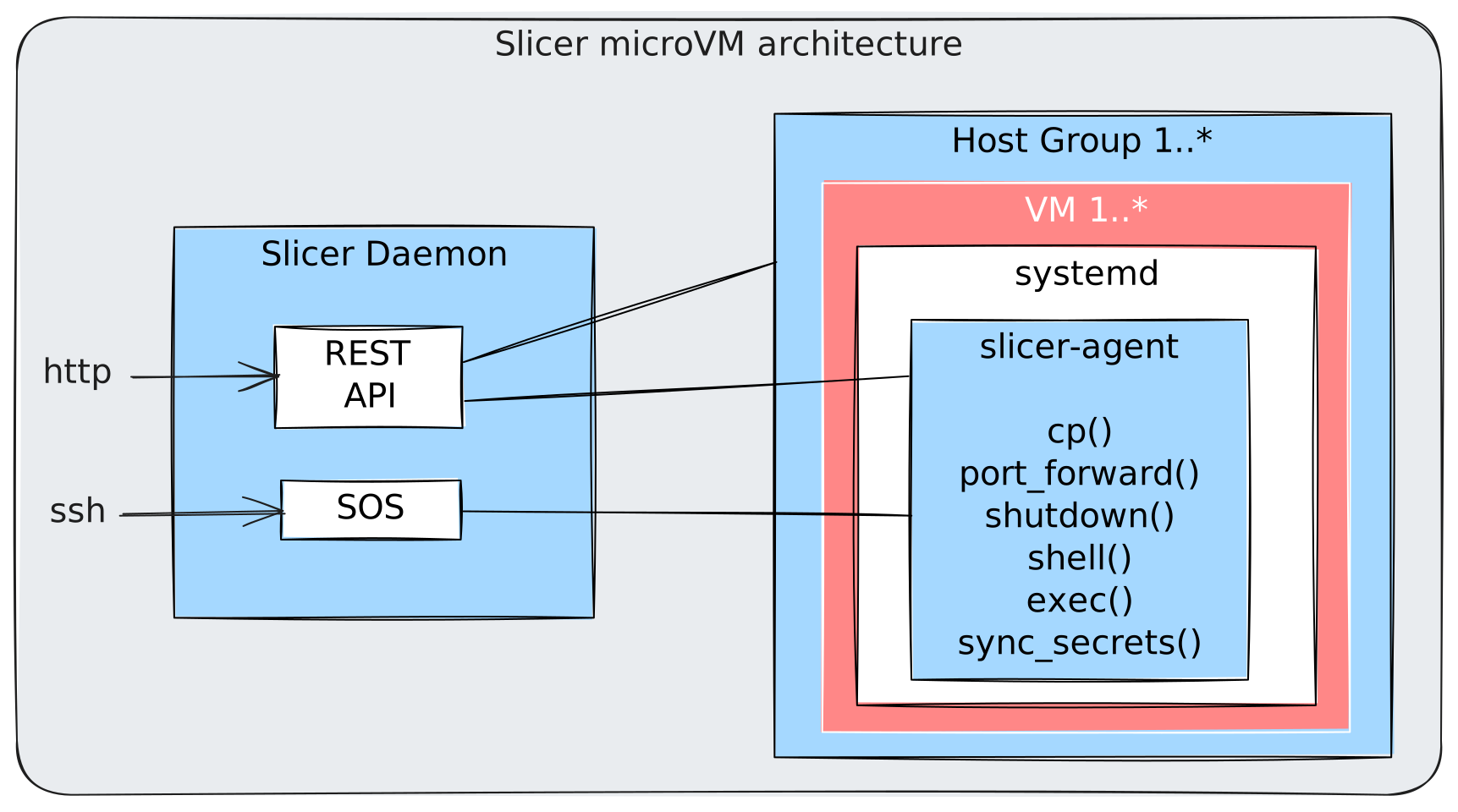
Slicer runs as a daemon and exposes API, CLI, and SDK management for microVM host groups.
- You define host groups and VM specs in YAML before launching VMs. These cannot be created via API at this point in time. Host groups need to have non-overlapping networking CIDRs defined.
- The guest agent
slicer-agentenables deep integration without having to use networking for: file copies, command execution, secret syncing, shutdowns, and direct shell access to the VM.
Where you can run it
Slicer runs on Linux, including x86_64 and arm64 systems, and on Apple Silicon via Slicer for Mac.
If you need local Linux on macOS, check out Slicer for Mac.
If you need production-hosted Linux microVMs, Slicer works well on bare-metal and in nested virtualisation on cloud providers.
You can also run it on WSL2 for local experimentation, labs, and home office use.
Next steps
- Install Slicer on Linux
- Install Slicer for Mac
- Try the walkthrough
- Slicer Platform - build on Slicer with the REST API and Go SDK
- GPU workloads with Slicer
- Get in touch for commercial questions